The Best SketchUp Car Models for Exterior Renders
Download SketchUp car models for exterior renders, plus tips on placement, color, performance and lighting so cars support the architecture.
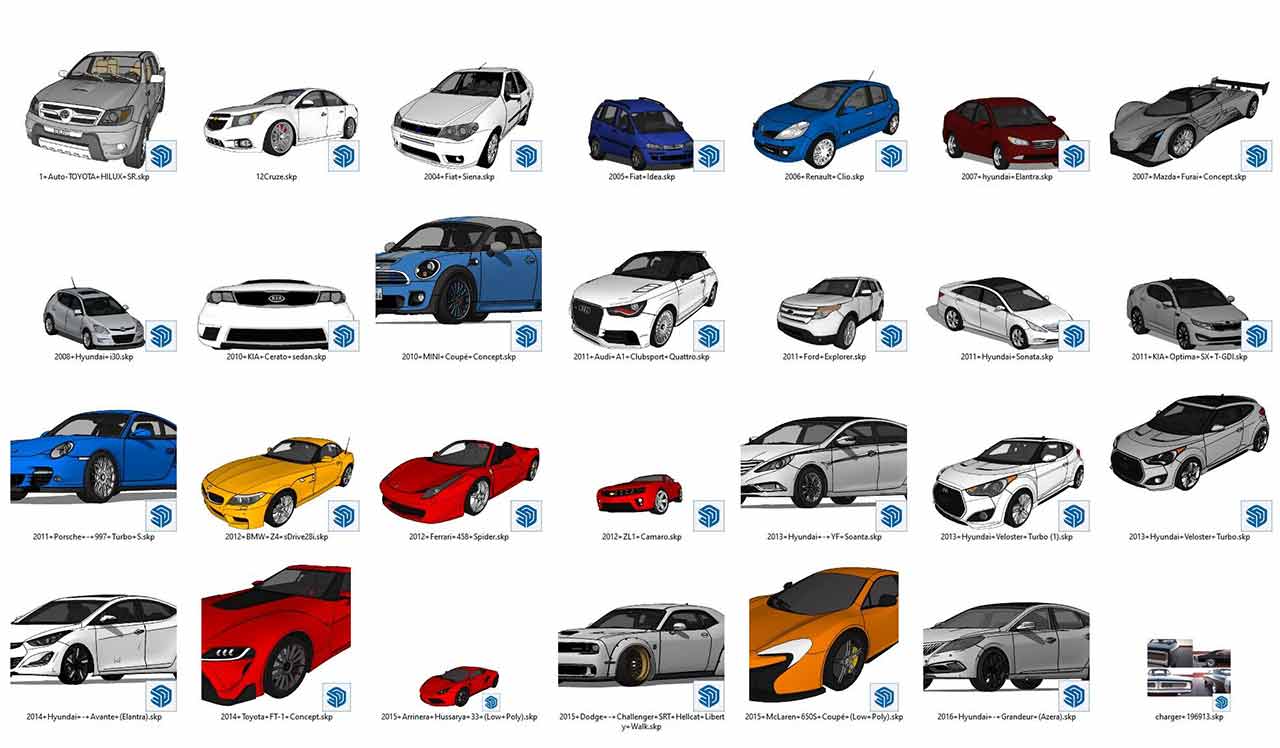
With the 3D car models we share below, you can get effective results in exterior visualization. These SketchUp car models for exterior renders are ready to drop into your scenes.
The Best SketchUp Car Models for Exterior Renders
Using car models in 3D exterior designs can bring many advantages:
- Scale and Proportions: When creating a realistic exterior design, the car models you use matter for scale and proportions. Integrating real car models into a 3D design lets you reflect sizes and proportions accurately. This makes your design more convincing in terms of realism and accuracy.
- Visual Interest and Human Scale: Car models add visual appeal to exterior designs. Recognizable, eye-catching cars add a visual element to your design and make your project more impressive. They also emphasize human scale, helping viewers better understand the size and breadth of your design.
- Movement and Flow: Car models can add a sense of movement and flow to exterior designs. A scene where cars travel along roads, park or make journeys can bring energy and life to your design. This helps show viewers the potential use of your design and how it can be lived in.
- Context and Realism: Car models are important for connecting your design to the real world and creating a sense of realism. By using car models to show environmental factors, traffic flow and social interaction, you can make your exterior design more realistic and believable.
- Marketing and Presentation: Using 3D renders and visuals is important when presenting or marketing a design project. By including car models in the renders of your exterior designs, you can better show potential clients or stakeholders how your project will look. This helps make your presentation more attractive and sales-oriented.
In conclusion, using 3D car models in exterior designs can bring advantages such as realism, visual appeal, human scale and a sense of movement and flow.
[git url=”https://www.mediafire.com/file_premium/or6vjn72z5ofjl8/mimari3d.com.rar/file” sn=”10″ text=”Default Download”]CLICK TO DOWNLOAD[/git]
For your architectural renders, you can reach us through our contact page.
Positioning 3D Car Models Correctly in the Scene
3D car models are a strong element of scale and life in exterior visualization, but when used incorrectly they can pull the focus of the image away from the architecture. The car should not be the star of the scene but a detail that supports the building. These tips will help when placing car models in SketchUp or another modeling program:
- Choose vehicles that suit the context: Everyday passenger cars fit a residential complex, service and delivery vans suit a commercial building, and simple, elegant models look more at home in a luxury project.
- Create a realistic parking layout: Place cars within parking lines, parallel to the road or angled but orderly; cars too close together or sitting in the middle of the road are distracting.
- Keep colors restrained: Neutral colors such as white, gray and black do not compete with the facade. A brightly colored car should only be used as a deliberate accent.
- Balance the number of vehicles: An empty parking lot looks deserted, while an overcrowded street looks cluttered. Strike a balance that matches how busy the scene should be.
Performance and File Organization
Detailed car models usually contain a large number of faces, and even a few copies can slow down the model. If you will use the same car more than once, placing it as a component keeps the file size under control. Choosing simpler models for cars far from the camera also keeps your workflow fast. Putting vehicles on a separate tag lets you hide them while modeling and make them visible only at the render stage.
At the render stage, the reflective paint of the car body mirrors its surroundings, so the scene’s sky and environment settings must also look right on the car. Checking that the tires sit firmly on the ground and that a soft contact shadow forms under the car removes the impression that it is “floating”.
In night scenes, headlights and brake lights act as separate light sources and bring the scene to life. Setting their intensity so that it does not overpower the building lighting keeps the focus on the architecture.
Frequently Asked Questions
Why are car models used as a scale reference?
The size of a car is a familiar measure in the viewer’s mind. A car standing next to a building makes it easier to grasp the height and width of the structure intuitively.
How do you create the effect of a moving car?
In post-render editing, applying slight motion blur to the car or headlight trails in the direction of travel can add a sense of flow to the scene.